
FoolTrottel
-
Posts
7,270 -
Joined
-
Last visited
-
Days Won
377
Content Type
Profiles
Forums
Downloads
Gallery
Events
Articles
Everything posted by FoolTrottel
-

Out now - ChkSkins - We share our skins!
FoolTrottel replied to FoolTrottel's topic in IL-2 Sturmovik: Great Battles Series
For you toad: Bos.reg -
Out now - ChkSkins - We share our skins!
FoolTrottel replied to FoolTrottel's topic in IL-2 Sturmovik: Great Battles Series
Sid, yeah, that's possible. You could make sure you do not have any 2K skins, I empty the Skault, and you upload all the skins. Oh, wait I can do that myself as well ... lol Problem is that once somebody else runs it, he might as well dump all 2K skins back in there! (Yes, I went way too fast here ) Working on a newer version with more 'intelligence' in it - but I found out the basic technique I used is not a good one, it makes operations troubled with some routers. So, I have to do some re-programming. Not impossible, but it will take some time. And, we need to discuss maybe what is needed/wanted: I will add that 4K filter, that may be sufficient - but still... how do we prevent broken or really "bad" skins from popping up in there? -
Out now - ChkSkins - We share our skins!
FoolTrottel replied to FoolTrottel's topic in IL-2 Sturmovik: Great Battles Series
Makes complete sense Arthur ... but it's too late now They are in!I think I've gone too fast too far with this maybe. If you think about it - it's kinda like a virus - spreading files all over Pc's all over the world lol. As for disk space it should not be a problem having all them skins in. As for selecting them for a flight - yes. That's a bummer. What if we can assign a skins-manager, he will maintain a list of proper and valid and perfect shared skins. He only can add them to the Skault, and all others can download those... (Version 0.90 will have that 4K Filter in it, but that check appears to result into a massive slow down!) -
Out now - ChkSkins - We share our skins!
FoolTrottel replied to FoolTrottel's topic in IL-2 Sturmovik: Great Battles Series
So, if you are really not interested in 2K skins, like Kevin is, I will try and see if I can add an option to filter out non-4K skins. -
Out now - ChkSkins - We share our skins!
FoolTrottel replied to FoolTrottel's topic in IL-2 Sturmovik: Great Battles Series
No problem. You could still use it by uploading your skins... for the community Just use 'Start Compare', wait, then press 'Start Upload' - you do not need to download! -
Out now - ChkSkins - We share our skins!
FoolTrottel replied to FoolTrottel's topic in IL-2 Sturmovik: Great Battles Series
Fixed it! -
Apart from the convenience of having the same skins so we will able to see each other' in mission, I also enjoy this laziness Both were basically the goal of this little project ...
-
Out now - ChkSkins - We share our skins!
FoolTrottel replied to FoolTrottel's topic in IL-2 Sturmovik: Great Battles Series
Arthur, save the attached file, then double click on it ... Bos.reg -
Out now - ChkSkins - We share our skins!
FoolTrottel replied to FoolTrottel's topic in IL-2 Sturmovik: Great Battles Series
Included in the zip is an example bos.reg. ChkSkins reads from the registry where Bos was installed to, and yeah, if you simply moved it somewhere else without uninstalling and re-installing ... then it fails. Editing the .reg file and double clicking it will fix the registry entry and chkskins will run properly... -
By downloading and installing and running ChkSkins, you can take part in this: "More Skins is good mkay..." dd_ChkSkins - v0.97 - 2020/06/09 - Excluded skins will now be deleted from the Skault, should an older version of ChkSkins have added one of those. dd_ChkSkins - v0.96 - 2020/05/22 - 4K is now checked at startup - A log file is being created - If a skin is in the list of excluded skins, it will be deleted, and not uploaded. This to prevent bad skins (ie. in the wrong a/c type folder) from spreading. dd_ChkSkins - v0.91 - 2019/11/12 Unzip the contents into a seperate folder, use its own folder preferably. First time run: Right click ChkSkins.exe, and select 'Run As Administrator' (Not needed for subsequent runs, maybe if there's a new version) +Allow it access through your FireWall. +It will read the registry for your GBS installation folder. If it cannot do that, it will let you know how. (I might be able to help you fix that) +Same membership check as CheckMods had, so let me know if it pops up like that. Operating it: - Press AUTO MODE Button, and it will compare the skins and download and upload all in one go. Afterwards, it will start comparing again, and download upload again, should it be neccesary (Failed downloads, or someone else has been adding a skin or two). By using the 1. Start Compare, 2. Start Download and 3. Start Upload buttons, you can do this all step by step. Special note on 'Only 4K Skins' check box: It will delete all locally found non-4K Skins! It will already start doing that once you press 'Start Compare', or 'Auto Mode' If you always want to run it in 4K mode, then run the file Chk4KSkins.cmd, also found in the Zip file! Exit button will close the programme :) DD_ChkSkins.zip

-
My stable is full of eels ...
-
That's a bit tricky, as when implemented, it will stop working once any new a/c type is being added... ChkSkins has no clue of types of a/c, it only recognizes files of type .dds, in the Skins folder... It's trying to be smart, but it is in no way intelligent, artificial or not... I do not see the reason for this request either? Oh, you only want a limited set of skins for a/c types downloaded: I could add a list where you can select what types to handle - or rather unselect the ones you do not want - but it probably won't save/store your selection. (Unless I figure out how to properly store that info in the registry...)
-
Not sure Crash, you may think it's ready, but I think it is not. Need to do some more tuning and stuff. And other shift.
-
You three are in now, you got invited to the PM ... Thanks!
-
Invited you both to a PM!
-
Thanks! I'll start a PM - will add more people when they show up.
-
In need of testers! Sign up here if you feel like you want to risk your skin(s)!
-
Indeed, such a return to 1946 is a good idea. Although - whenever it 'd be up, I suspect the number of "My %$**&& Controls are ffttupped!" will make it all rather short lived! 😎
-
Googled a bit, and created this: Set fld="D:\Bos\Data\Graphics\Skins" Rem 4K is 16777344, so a bit less. Set FSize=16777340 Rem Show the files within this selection @ForFiles /P %fld% /S /C "Cmd /C If @IsDir==FALSE If @FSize LEq %FSize% echo @FSize0x09@Path" Pause Rem Delete the files within this selection @ForFiles /P %fld% /S /C "Cmd /C If @IsDir==FALSE If @FSize LEq %FSize% Del @Path" 1. Copy/paste the text into notepad, save as a .cmd file (Yeah, you know) 2. Set your skins folder in the first line, this one is mine. 3. Run it. It will show all skins smaller than 4K. It will then wait for a key press. If you press the key, the files listed will be deleted! If you do not want that to happen, hit Ctrl-C Edit: Note that this one does it recursively, so it includes all sub-folders as well. Tested this on my Pc, works. Very handy that ChkSkins is there, the 14 skins I deleted this way, were easily downloaded again... it's cool!
-
Okay, so who'd want to be testing this thing? I'll start a PM with the files you need, and instructions and....
-
Yea, for sure, I do not get it. But, it doesn't really matter me thinks. If you do not want/need 2K skins, then delete them from your skin folders after you run the tool. Or, make sure your 4K ones have the same name as the ones in the vault, that way they will be left alone, as in not being downloaded, and not being uploaded. How am I to tell what are 4K skins anyways? Size? What if we start using 6.5K skins? If you want only/mostly 4K skins, then do the following: 1. Become Beta tester 2. Build your complete set of 4K skins 3. Run the tool. Upload them all - I will have made sure the Skault is empty 4. Tell everybody to delete the contents of their Skins folder, and then run the tool. (Hm. I can and will create a button for that ....) Problem solved!
-
WTF? Different sizes of skins. My My, what silliness will they think of next? Now if I add such a filter, the whole point of this exercise will be lost. If and when I use a 2K skin, you won't see it ... so ... I will add the most sensible option for this 'issue': Do not use it! I probably am not getting it...
-
Well, I think you've answered your own question now, haven't you?
-
lol... I'm sure I'll make it download-only for you then
-
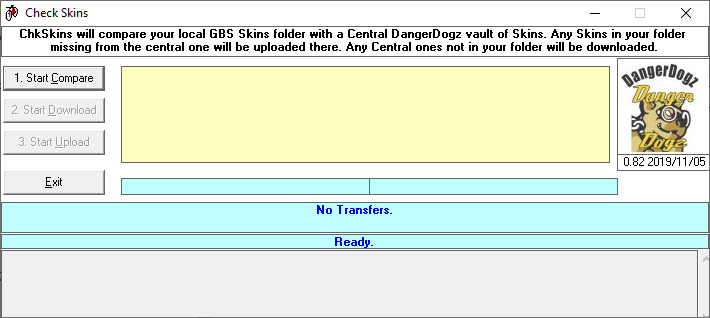
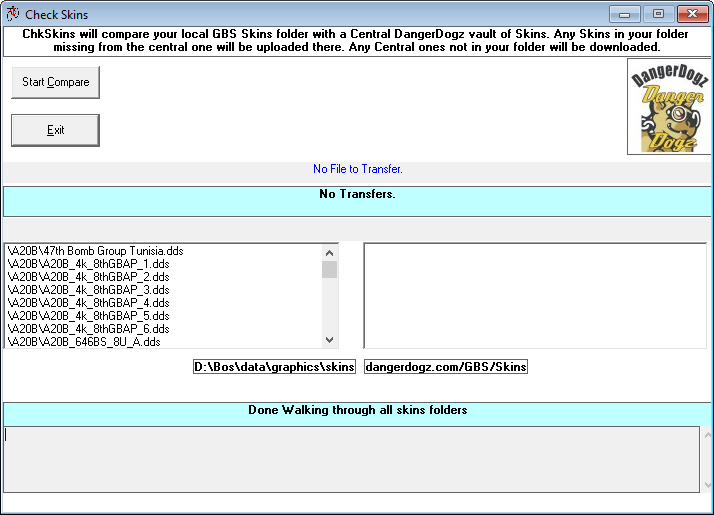
Currently working on a thing called CheckSkins ... The idea is to run it every now and then on your gaming PC. It will have the same usage restriction as CheckMods had: One has to be a DD to use it! (Could open it up for everybody - but we would probably run into Bandwidth issues - lol) * It will upload all your skins to a central location, if they are not there already. * It will download all skins from the central location to your skins folder, if they are not there already. * It will be file-name based, including only .dds files. It will not be contents based. Yes, this will pose a problem when you update a skin! Not sure how to handle this, and whether this will be a problem! (It's always possible to manually delete files from the central location...) On the one hand, I would like it to be as automated as possible - you start it, and it does its thing, up- and download missing skins. However, I can imagine one would want some options: 1. Only download locally missing skins 2. Only upload centrally missing skins (Wait, this one makes no sense at all!) 3. Both Here's a preview: Any suggestions? Remarks? Ideas? Feel free, go ahead!